Views: 0 Author: Site Editor Publish Time: 2026-10-18 Origin: Site
Deploying displays in curved, waved, or cylindrical environments introduces unique physical complexities. Conventional rigid panels simply cannot adapt to fluid architectural designs. Visual integrators face immense pressure to deliver flawless panoramas in broadcast studios, retail spaces, and corporate lobbies. The RF Series Flexible LED Screen offers a high-performance solution for these demanding spaces. However, achieving seamless visual outcomes relies heavily on precise structural preparation. A poorly prepared substructure quickly derails a project. It often leads to visible seams, fractured modules, and extensive rework.
This guide provides system integrators, AV technicians, and project managers an unvarnished look at core installation requirements. You will learn how to mitigate deployment risks through exact framing and thermal planning. We cover everything needed to prevent costly mid-project redesigns. Master these techniques to ensure a spectacular final display.
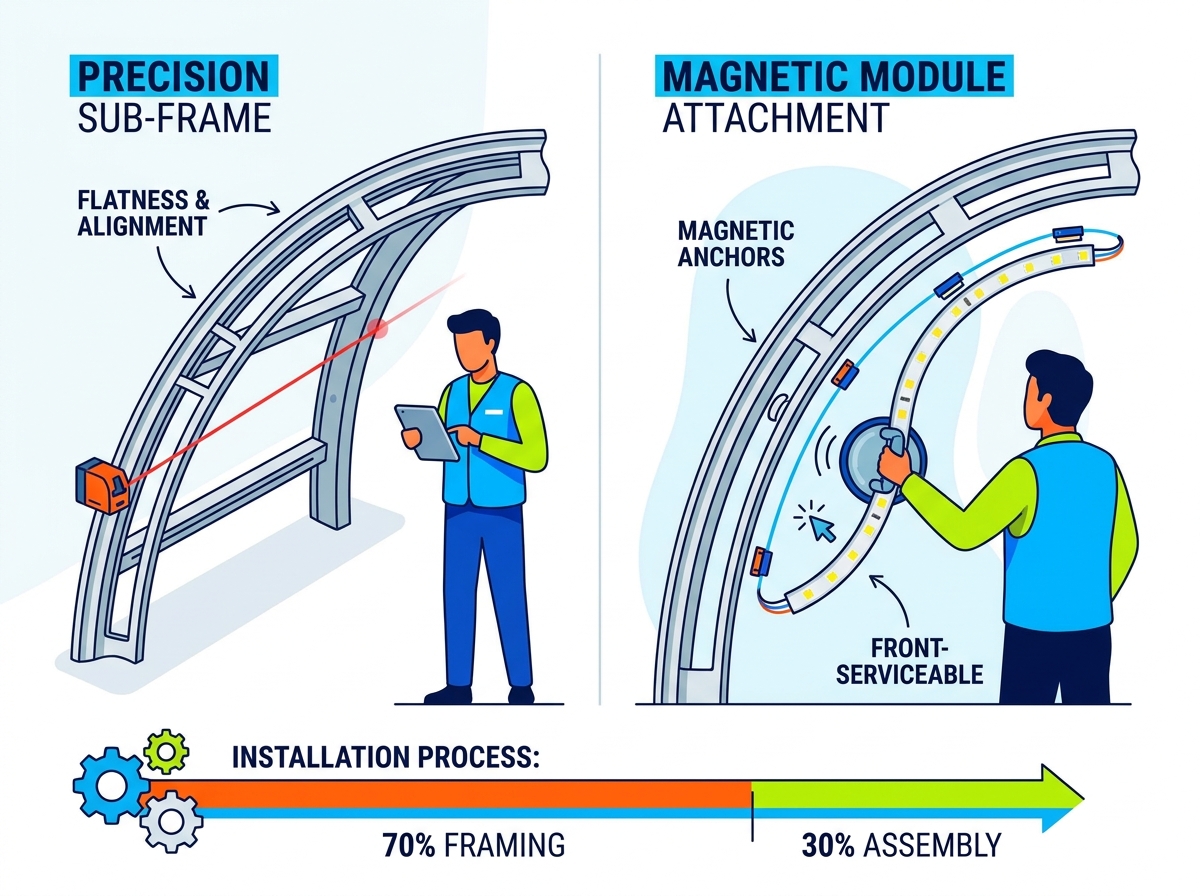
Substructure dictates success: 70% of installation time should be dedicated to framing and leveling; the RF Series' magnetic modules conform strictly to the frame's accuracy.
Respect physical limits: Adhering to the specified minimum bending radius prevents micro-fractures in PCB solder joints and prolongs module lifespan.
Front-serviceability accelerates ROI: The magnetic design simplifies both initial mounting and long-term maintenance, reducing operational downtime.
Thermal planning is non-negotiable: Curved and enclosed installations require proactive heat dissipation strategies to prevent localized overheating.
Achieving a flawless display begins long before unboxing the panels. You must define clear substructure requirements early. Installers need a custom sheet metal or steel sub-frame. Engineers must design this structure to match the exact desired curve. We cannot stress flatness and alignment tolerances enough. A frame lacking precision will cause visible seams between flexible modules. Uneven metal surfaces create tiny gaps. Viewers will notice these gaps immediately when standing close to the screen.
To ensure framing success, adhere to several core best practices:
Opt for CNC-machined aluminum over standard steel to reduce structural weight and improve dimensional precision.
Treat all metal surfaces applying an anti-rust coating to prevent long-term degradation.
Incorporate dedicated cooling channels into the frame design for passive thermal management.
Conducting a thorough environmental profile prevents long-term hardware failures. You should evaluate ambient temperature, humidity, and airflow patterns thoroughly. Recessed or architectural integrations trap heat easily. Poor ventilation degrades diode lifespans significantly. Calculate your required power draw accurately. Evaluate your data redundancy needs simultaneously. Base these calculations on the total screen resolution. Do not rely solely on the physical footprint. High-resolution pitches draw more power per square meter.
Finally, verify all bending constraints rigorously. Always define the minimum bending radius of your specific pixel pitch. Flexible printed circuit boards (PCBs) have strict physical limits. Do not attempt multi-axis curves or compound curves. Only proceed if the module specification explicitly supports complex bends. Forcing bends outside these limits damages internal components permanently. It causes micro-fractures in the solder joints. These fractures lead to dead pixels shortly after deployment.
Proper preparation requires auditing your inventory. It also requires equipping your crew correctly. Upon delivery, perform a strict inventory check immediately. You will receive flexible modules, receiving cards, and power supplies. The shipment also includes data cables and specialized magnetic anchors. Verify all quantities before beginning any assembly. Missing components halt installation progress entirely.
Gather your integration tools well in advance. Precision instruments are mandatory for a seamless build. Use rotary laser levels and digital protractors. These tools verify frame alignment perfectly. Technicians need specialized suction module removal tools. These allow for safe handling and micro-adjustments. You also need calibrated torque screwdrivers. They ensure secure cabinet assembly. Torque controls prevent technicians from stripping screw threads during power supply mounting.
Plan your labor assumptions carefully. Estimate your headcount based on project scale. Allocate a minimum of two technicians for module handling. One person holds the panel while the other secures it. You must also include structural engineers. They validate the frame integrity before electrical work begins. Proper staffing prevents rushed work and accidental damage.
Ensure your staging area contains the following required items before initiating the build phase.
Tool Category | Specific Item | Primary Application |
|---|---|---|
Measurement | Rotary Laser Level | Verifying substructure flatness and horizontal alignment. |
Measurement | Digital Protractor | Confirming exact bending angles on custom sub-frames. |
Handling | Magnetic Suction Tool | Safe removal and micro-adjustment of magnetic LED modules. |
Assembly | Torque Screwdriver | Securing power supplies and receiving cards without overtightening. |
Start by installing your customized structural frame securely. Continuous verification ensures long-term success. Among top LED installation tips, using a laser level constantly stands out. Measure across multiple points on the frame. A deviation of even 1mm amplifies quickly. It will create a highly visible gap once technicians attach the LED modules. Weld or bolt the frame components carefully. Ensure no metal burrs protrude from the surface. Clean the metal face thoroughly to guarantee perfect magnetic adhesion.
Map your cabling topology clearly before attaching any modules. Install power supply units (PSUs) onto the frame first. Mount your receiving cards securely adjacent to the PSUs. Route data cables methodically between cards. Secure all cables tightly using zip ties or clips. Loose wiring interferes directly during the final phase. It prevents the magnetic seating of the modules from sitting flush against the metal. A trapped wire causes the module to bulge outward. This ruins the smooth curve of the display.
Handle modules strictly by their plastic edges. Touching the front face directly causes damage. Oils and pressure harm delicate surface-mounted devices (SMDs). Check the directional arrows printed on the back. Align them carefully to ensure uniform polarization. This also guarantees an accurate pixel layout. Snap the modules into place using their magnetic anchors. Start from the center of the structural curve. Work outward systematically toward the edges. This method distributes physical tension evenly across the surface. It prevents the modules from buckling under pressure.
Data flow mapping dictates how the display processes imagery. You must configure the receiving cards accurately. Use standard control software like NovaStar for this step. Curved designs often feature non-standard resolutions. System integrators must address these complexities during the initial software setup. Mapping custom pixel dimensions requires attention to detail. Map the data cascade perfectly to avoid distorted images. Test the signal path using standard test patterns.
After mapping, focus on seam adjustment and visual tuning. Technicians often spot dark or bright lines between modules. These lines result from microscopic tension. They also occur due to tiny physical gaps. Dark lines indicate a physical gap between panels. Bright lines indicate panels pushing too tightly together. Use a suction tool to shift modules slightly. Close gaps or relieve pressure carefully.
Finally, perform comprehensive color and brightness calibration. This step ensures uniform image quality. Curved screens present unique viewing angle challenges. Brightness appears different depending on the viewer's position. Follow these standard calibration steps:
Generate a pure white test pattern to expose brightness inconsistencies across the entire screen.
Identify and document any dark or bright lines across the physical module seams.
Deploy the suction tool to micro-adjust module positioning mechanically.
Execute software-based edge correction to blend the remaining visible seams virtually.
Run a final colorimeter pass to lock in the desired Rec.709 or DCI-P3 color space perfectly.
Integrators often face specific mechanical and environmental challenges. Identifying problems early prevents permanent hardware damage. We outline the most frequent risks below.
Excessive physical stress destroys flexible modules quickly. The primary symptom involves dead pixels or intermittent line failures across the panel. The solution requires strict adherence to the spec sheet’s bend radius. Never force a module to fit an inaccurate frame. If the frame curve exceeds the module tolerance, you must redesign the sub-frame immediately.
Heat accumulation degrades visual performance rapidly. The symptom usually presents as color degradation or sudden hardware failure in the center of the screen. The solution requires proactive thermal management. Integrate active cooling systems behind the sub-frame. Install exhaust fans or dedicated HVAC ducts to manage heat buildup effectively.
Improper seating disrupts the entire visual experience. The primary symptom manifests as modules appearing "bumpy" or misaligned along the curve. The solution requires a physical inspection. Check for trapped cables behind the module. Look for metal burrs left on the sub-frame during fabrication. Use a suction tool to remove the module safely. Clear the obstruction completely, then reseat the panel flush against the metal.
Installation Troubleshooting Matrix
Observed Symptom | Probable Cause | Recommended Solution |
|---|---|---|
Intermittent line failures | Micro-fractures from over-bending. | Verify bend radius; redesign frame if necessary. Replace damaged module. |
Central color degradation | Thermal throttling/overheating. | Install active exhaust fans behind the structural frame. |
Visible surface bumps | Trapped wires or metal burrs. | Remove module with suction tool, clear obstruction, reseat cleanly. |
Installing a highly flexible display remains an exercise in structural precision. The magnetic front-attachment system makes the actual screen assembly highly efficient. However, the final visual outcome relies entirely on rigorous pre-installation framing. Buyers must factor custom fabrication into their overall project budget. Specialized AV labor is also crucial for success. Careful planning ensures a spectacular and durable installation.
You must prioritize exact measurements and strict thermal planning. Ignoring environmental factors leads to rapid hardware degradation. Protect your investment by executing each phase methodically. Next Steps: Download the technical specification sheet for your chosen pixel pitch. Consult directly with an integration specialist for custom sub-frame blueprints. Request a customized quote based on your specific project dimensions. Execute these steps to secure a flawless visual experience.
A: The exact radius depends heavily on the specific pixel pitch you select. Tighter pitches generally allow for smaller radiuses. You must check the official spec sheet for exact limits. Exceeding this specified limit damages the internal PCB components permanently. Always adhere strictly to the manufacturer's bending constraints.
A: Yes, the magnetic design enables full front-serviceability. Technicians can easily remove individual modules using a specialized suction tool. This capability reduces maintenance downtime significantly. It also eliminates the need for bulky rear access catwalks in tight architectural spaces.
A: While mounting to an existing wall is theoretically possible, we do not recommend it. A custom metal sub-frame is almost always required. It provides the absolute flatness and secure magnetic adhesion necessary for a seamless display. Standard drywall curves rarely meet the millimeter-level precision required.
A: These highly flexible modules typically feature an indoor-only IP rating. They lack the extensive weatherproofing required for direct outdoor exposure. Always check the specific IP rating of your model. Deploy them strictly within climate-controlled indoor environments unless the manufacturer explicitly specifies outdoor capabilities.