Views: 0 Author: Site Editor Publish Time: 2026-11-28 Origin: Site
Organizing a massive live concert demands absolute perfection. Technical directors, event producers, and tour managers face a constant, high-stakes battle. You must balance high-fidelity visual requirements against strict logistical, budgetary, and venue-specific rigging constraints. A successful live show requires specialized hardware preventing zero-latency processing failures. It must actively manage high ambient light and guarantee fail-safe operation from the first chord to the final encore. Our objective here is to provide an objective, technical framework. We will help you confidently specify and procure the ideal equipment. This guide minimizes on-site execution risks for large-scale events. You will learn exactly how to match hardware specifications to venue architecture. We will also show you how to navigate complex vendor proposals and secure reliable performance for every tour stop.
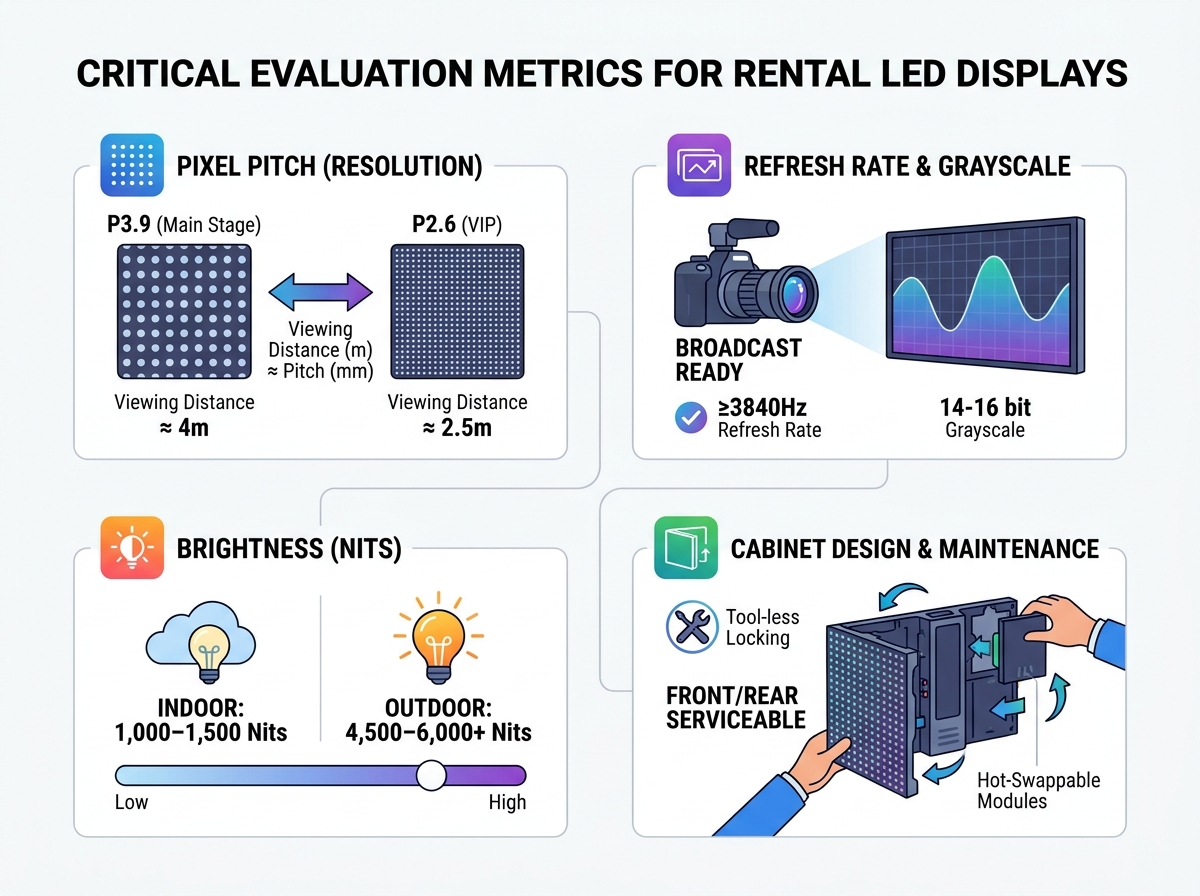
Viewing Distance Dictates Pixel Pitch: Standard concert setups typically require P3.9 to P4.8 for main stages, while close-proximity VIP areas may demand P2.6.
Camera Readiness is Non-Negotiable: Broadcast and IMAG (Image Magnification) screens require high refresh rates (≥3840Hz) to prevent scan lines and moiré effects on camera.
Environment Defines the Build: Outdoor venues necessitate IP65-rated enclosures and high-brightness diodes (5,000+ nits), while indoor arenas focus on contrast ratios and lower brightness configurations.
Rigging and Logistics Drive Total Cost: The raw rental rate is only part of the investment; structural engineering limits, power distribution, and local union labor availability heavily impact final costs.
Every successful tour begins with an accurate venue assessment. You cannot select a Large venue LED display without mapping the physical space first. Assess audience sightlines carefully from multiple seating tiers. Measure both horizontal and vertical viewing angles. Calculate the maximum audience depth from the downstage edge. These metrics directly determine your optimal screen dimensions and required curvature. Ignoring sightlines often leaves side-section ticket holders staring at blank cabinet edges.
Next, evaluate your content and resolution targets. You must analyze the native aspect ratio of your generated media. Will designers use a standard 16:9 format or a custom ultra-wide canvas? Coordinate your total pixel counts with the media server's processing capabilities. High-end servers map pixels pixel-for-pixel. Mismatched resolutions cause dropped frames and stretched imagery. This ruins the immersive audience experience.
Ambient light variables dictate your hardware brightness needs. Frame the necessity for variable brightness control early on in planning. You need hardware capable of transitioning smoothly without color banding. It must adapt from high-intensity daylight setups to calibrated, glare-free night configurations. Sunset transitions remain the hardest lighting scenarios to manage live. Your control software must allow quick, precise brightness stepping.
Finally, distinguish between IMAG and scenic applications. IMAG (Image Magnification) relies on live-camera feeds. These feeds require ultra-low latency and exceptionally high refresh rates. Delay causes lip-sync issues on massive screens. Background scenic elements serve a completely different purpose. They accommodate creative shapes and possess a lower resolution tolerance. You can mix panel grades to optimize the budget effectively.
Choosing the right hardware shape and structure is crucial for touring execution. We categorize these choices into four distinct deployment types for live shows.
Modular Panel Walls (Indoor/Outdoor): Standard 500x500mm or 500x1000mm tiles offer incredible flexibility. You use them to build custom stage backdrops. They form curved arrays and stunning flown ceiling elements effortlessly. Modular tiles lock together quickly using specialized rigging frames.
Mobile/Trailer LED Screens: Festival environments often require rapid-deployment trailer screens. You trade some creative limitation for incredible deployment speed. They roll in, lift up pneumatically, and operate within an hour. They work perfectly for overflow crowd areas.
Transparency and Creative LED: Mesh and transparent options allow layered visual effects. They integrate beautifully behind intelligent lighting fixtures. Keep in mind their susceptibility to lower contrast in high ambient light. Direct sunlight easily washes out transparent meshes.
Structural Integrity & Certifications: Outdoor concert applications demand rigorous safety standards. Highlight the requirement for CE and UL certifications. You must insist on wind-load-rated ground support systems. Weather changes rapidly, and uncertified structures pose immense danger.
Never ignore hardware safety certifications during procurement. Venues will halt your build if you lack proper documentation. Local fire marshals and safety inspectors demand proof of structural integrity before opening doors.
You must evaluate your Rental LED Display using strict technical metrics. Guesswork leads to poor visuals and blown tour budgets. Industry professionals rely on specific data points.
Pixel pitch defines your physical screen resolution. We use a standardized formula to guide this specific choice. The optimal viewing distance in meters roughly equals the optimal pixel pitch in millimeters. If your front row sits four meters away, a P3.9 or P4.8 screen works perfectly. This rule helps you avoid over-specifying. You stop overpaying for unnecessary resolution the audience cannot even see.
Refresh rate and grayscale control camera readiness entirely. Live entertainment involves heavy video recording and smartphone capturing. We mandate minimums of 3840Hz for any broadcast event. You also need 14-bit or 16-bit grayscale processing. These standard criteria prevent ugly scan lines on screens. High grayscale ensures smooth gradients in dark shadows.
Brightness thresholds vary heavily by operating environment. Establish your baseline expectations before signing a rental contract.
LED Display Metric Guidelines
Environment | Recommended Brightness (Nits) | Primary Consideration |
|---|---|---|
Indoor Arenas | 1,000 – 1,500 | High contrast and deep black levels |
Outdoor Daytime | 4,500 – 6,000+ | Overcoming direct sunlight glare |
Broadcast/Studio | 800 – 1,200 | Color accuracy and high refresh rate |
Cabinet design impacts your show execution directly. Prioritize front-serviceable and rear-serviceable designs. Emphasize the importance of tool-less locking mechanisms. They allow rapid assembly during tight load-in windows. They also enable emergency module replacement during a live show. A technician can swap a broken magnetic module in seconds without tools.
A brilliant screen means nothing if you cannot hang it safely. Weight limits represent the primary risk in concert deployment. Prevent structural overloading at all costs. Detail the necessity of calculating the total hanging weight. You must include panels, rigging bumpers, and all heavy cabling against venue truss capacities. Use digital load cells during load-in to verify actual hanging weights.
Power and data redundancy prevent disastrous mid-show blackouts. Frame the requirements for uninterrupted power supplies (UPS) at front-of-house. Build redundant data loops using primary and backup fiber lines. Fiber optic cables manage data over long stadium distances better than CAT6. Dual-controller setups guarantee the show continues even if one primary processor fails.
Outdoor rentals require strict weather tolerance and regulatory compliance. Mandate true IP65 ratings for both front and rear components. Combine this physical protection with active heat dissipation systems. This prevents thermal throttling during hot summer music festivals. Electronics degrade rapidly when internal cabinet temperatures spike.
Relying on distant warehouses creates immense logistical risk. We emphasize a vital industry standard for touring shows here. Require a minimum 5-10% spare parts allocation strictly kept on-site.
Keep spare receiving cards programmed and ready at the control desk.
Store extra magnetic LED modules directly behind the stage for quick access.
Maintain backup power supplies in easily accessible, clearly labeled road cases.
Carry spare fiber tactical lines to bypass damaged cable runs instantly.
Finding the right equipment partner requires diligent evaluation. First, assess their technical competence deeply. Scrutinize the vendor's ability to provide detailed CAD drawings. They must supply accurate weight load calculations and pixel-mapping documents alongside their quote. Vague quotes or missing drawings signal inexperienced providers. True professionals map every cable path before the truck leaves the warehouse.
Review their Service Level Agreements (SLAs) very carefully. Compare wet-hire arrangements against dry-hire options. A wet-hire includes dedicated video technicians, VJs, and professional riggers. Dry-hire provides the raw equipment only. We strongly suggest wet-hire for critical live shows. Expert hands save shows when complex troubleshooting gets tough under pressure.
Evaluate local support versus national reach. Using regional providers offers lower freight costs and faster local response times. National tier-one production houses provide completely different advantages. They boast a larger inventory depth for massive multi-screen tours. Choose based on your tour's specific geographical footprint. A multi-state arena tour usually requires a national vendor.
Perform a rigorous hidden cost analysis before signing anything. Proposals often contain sneaky exclusion clauses. Identify common omissions like heavy equipment rentals, including specialized forklifts. Watch out for mandatory union labor minimums in major arenas. Factor in generator fuel costs and overnight freight charges for emergency replacements. Clarifying these terms prevents budget blowouts mid-tour.
Selecting the right visual equipment is fundamentally a risk-management exercise. Every technical decision impacts the safety and success of your live event. Over-indexing on raw screen price often leads to severe compromises down the line. You risk structural safety, processing reliability, or on-site technical support. Cheap hardware often lacks crucial redundancy features.
Encourage technical directors to finalize their CADs and power requirements first. Complete these exact steps before initiating the vendor RFP process. This preparation ensures true apples-to-apples comparisons across different bids. You force vendors to quote the exact same parameters. Ultimately, meticulous planning helps you secure reliable hardware. You will protect your touring crew and deliver an unforgettable audience experience night after night.
A: Use the 1mm to 1m rule of thumb. If your closest audience member sits 4 meters away, a 4mm (P3.9 or P4.8) pixel pitch is ideal. This formula ensures optimal viewing distance without overpaying for unnecessary resolution that the human eye cannot resolve from afar.
A: Power calculates in watts per square meter. Maximum power consumption occurs during all-white content bursts. Average power consumption runs much lower during normal video playback. You must specify power distribution based on the maximum draw to prevent tripped venue breakers during intense visual strobe effects.
A: No. Indoor panels lack necessary environmental sealing. Moisture exposure quickly destroys internal electronics without strict IP65 ratings. Furthermore, indoor panels suffer severe brightness deficits outside. They usually max out around 1,500 nits, making them completely invisible against daytime ambient sunlight.
A: Modern rental cabinets feature hot-swappable magnetic LED modules. A standby technician positioned behind the stage can pop out the dead module and snap a new one into place within seconds. This requires zero tools and does not interrupt the primary video signal running to the rest of the wall.
A: A typical flown video wall adds a substantial load. Expect a standard range of 25 to 40 lbs per square meter. This variance depends heavily on the specific touring frame, the thickness of the protective cabinet, and the density of the attached power and data cabling.